
Logbook signature
Loading…
1. Check your certificate
Only flight instructors can sign. Your name and certificate number are checked against the FAA airmen registry before you sign.
2. Sign
Certificates held
Currency status
This is a summary generated from the pilot's own logged data in Hobbslogbook and isn't independently verified. It updates automatically as they log new flights.
The pilot logbook that tells you what you're missing
Hobbslogbook tracks your currency, your checkride requirements, and your aircraft, and tells you exactly what's left to do, not just a pile of numbers. Built by a pilot, for pilots.
No card needed. Cancel anytime. Your logbook stays yours, even if you leave.
Start your free trial
30 days with everything unlocked, including Pro. No card needed.
Need help? Contact support.
We email you a link to verify your address. Your logbook is saved to your account and syncs across your devices.
Both plans start with a free 30-day trial. No card required to begin. See full pricing & details.
Standard
$10/month or $100/year
Stay legal and organized
- Unlimited logbook and currency tracking
- Checkride progress and the 8710 form
- Imports, exports and sign-offs
Pro
$15/month or $150/year
Fly smarter, own with confidence
- Everything in Standard
- Preflight go/no-go against your minimums
- Real weather saved on every flight
- Aircraft maintenance tracking
Every plan starts with a free 30-day trial that unlocks everything, including Pro. Compare plans
Your logbook stays yours, even if you leave. Download it to Excel or CSV any time, including after your trial or plan ends.
See it in action
Screens from the sample logbook of Sam, a made-up pilot. to click around, no sign-up needed.
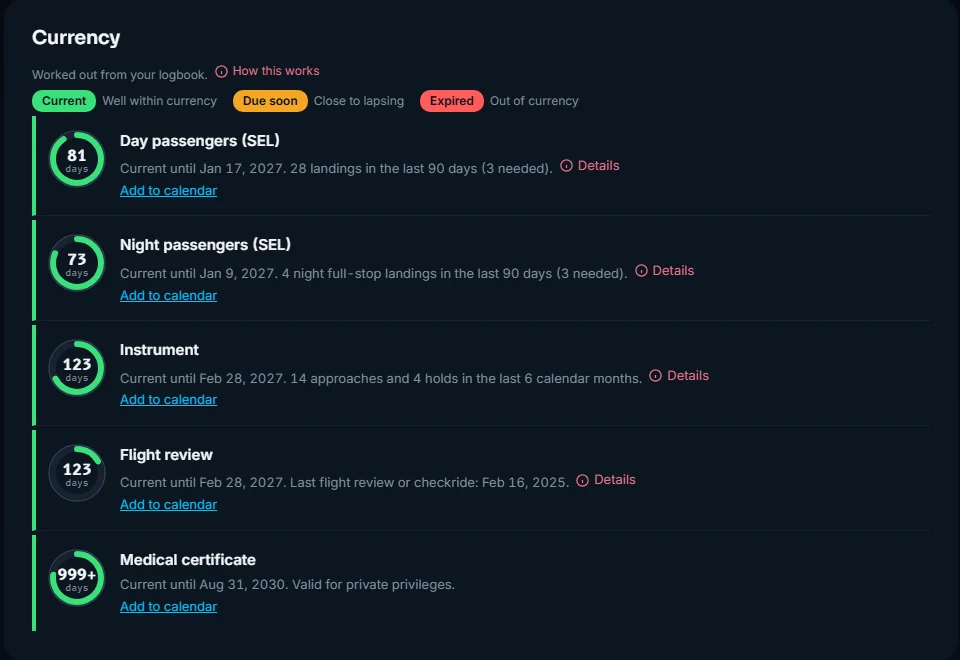
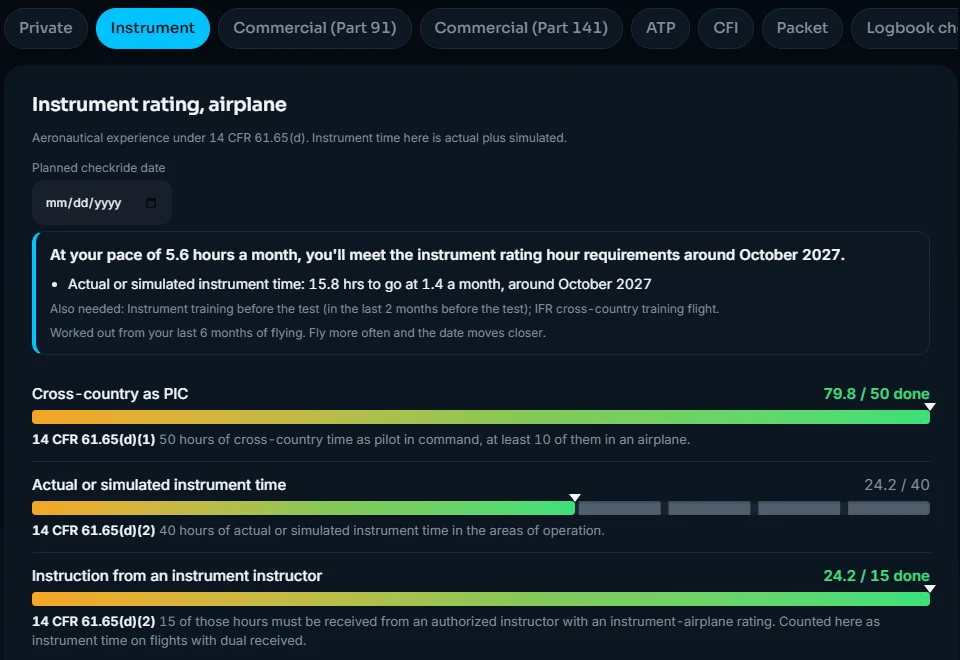
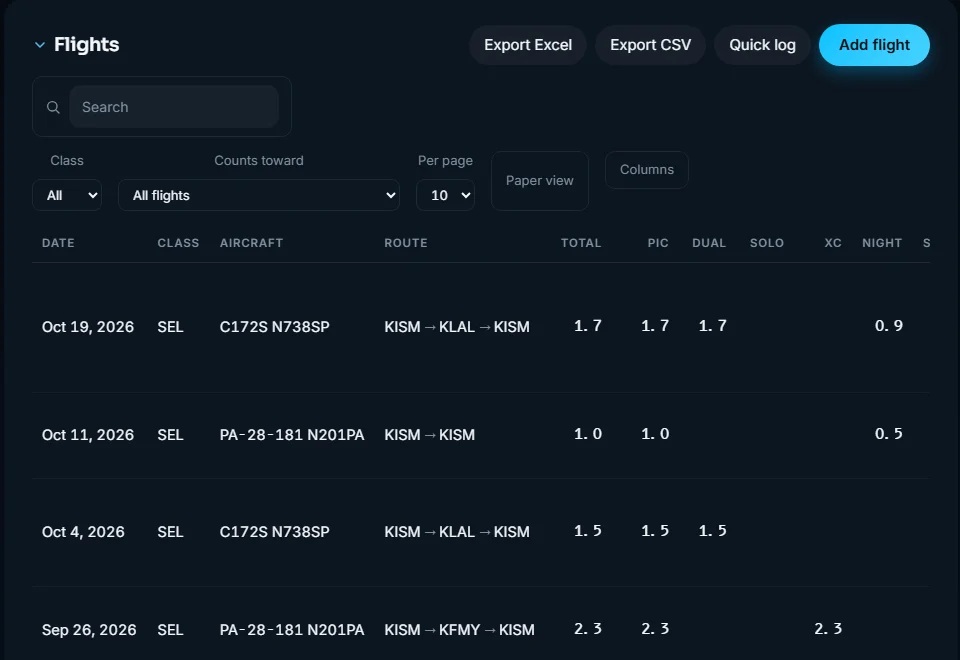
A digital pilot logbook built around what you need next
Hobbslogbook replaces the paper logbook and the spreadsheet. Log a flight in seconds, or start the flight timer at engine start, and your totals, FAA currency and checkride progress update on their own.
Currency in plain English
Day and night passenger currency, IFR currency, flight review and medical dates, with exactly how many landings or approaches you still need.
Checkride requirements
Private, Instrument, Commercial, ATP and CFI requirements under 14 CFR 61, with progress bars and the hours left for each one. Fill in the 8710 from your logbook.
Import from ForeFlight
Bring in a ForeFlight PDF or CSV export, or photos of a paper logbook. Export to Excel or CSV any time; your logbook is always yours.
Aircraft, airports and costs
Hours by tail number, every airport you've landed at on a map, and what your flying really costs per hour. Pro adds maintenance due dates for annuals, 100-hours and more.
For students and instructors
Instructors sign flights and endorsements digitally and follow each student's progress for free.
Works everywhere
Runs in the browser on iPhone, Android and desktop, installs like an app, works offline and syncs across your devices.
What pilots say
Why I built Hobbslogbook
I'm Bailey, a student pilot. I wanted a logbook that did more than add up hours: one that told me which currency was running out, how far I was from my checkride, and what my flying actually cost. So I built it.
I read every message. If something's missing or wrong, tell me at support@hobbslogbook.com or say hi on Instagram @hobbslogbook.
Questions pilots ask
Is Hobbslogbook a legal FAA logbook?
14 CFR 61.51 doesn't require a paper logbook, and electronic logbooks are widely accepted. Hobbslogbook records every field 61.51 asks for, supports instructor signatures, and exports a complete record whenever you need one.
Can I move my logbook from ForeFlight or paper?
Yes. Import a ForeFlight PDF or CSV export, or photos of paper logbook pages, and your history and totals come across.
How much does it cost?
Every plan starts with a free 30-day trial with no card needed. After that, Standard is $10 a month and Pro is $15 a month, or less paid yearly. Military members and veterans get 25% off. Instructor tools are free.
What happens to my logbook if I stop paying?
It stays saved, and it's still yours. After a trial or plan ends you can still sign in and download every flight to Excel or CSV. If you come back, everything is where you left it.
How is it different from LogTen?
Hobbslogbook runs on any phone or computer, including Android and Windows, and focuses on telling you what's next: currency, checkride requirements and costs. See the full comparison.
Does it work offline?
Yes. Hobbslogbook installs on your phone's home screen, keeps working without signal, and syncs when you're back online.
Pricing · Compare with LogTen ·For flight schools: Hobbs FlightOps · Privacy · Terms
More totals
Flight in progress
Get started
My Instructors
This month's challenges
Your next certificate
Pilot card
A summary of your flying from this logbook. It isn't an FAA certificate.
Goals
Weather
Flights
| Date | Class | Aircraft | Route | Total | PIC | SIC | Dual | Solo | XC | Night | Act inst | Sim inst | Cmplx | Appr | Ldg | Remarks |
|---|
No flights yet. Tap Add flight to log your first one.
Weight and balance
Copy these from your aircraft's current weight and balance record and the POH (section 6). Every airplane's empty weight is different, so use this aircraft's own numbers, not a sample.
Loading stations
Center of gravity envelope (normal category)
The corners of the envelope from the POH chart, in order around the edge: arm (inches aft of datum) and weight. A typical one has 4 or 5 corners.
Add aircraft
Training time counts toward a certificate only when your instructor signs it. Each instructor below gets one link to review your flights with them and sign them all at once. They don't need an account, and they can untick anything that isn't right. Their name and certificate number are checked with the FAA before they sign.
Printable logbook
Your flights laid out like the pages of a paper logbook, with page totals, amounts forwarded and instructor signatures. Print it, or save it as a PDF.
Choose your plan
Standard
$10/month
Stay legal and organized
- Unlimited logbook
- Currency tracking and reminders
- Checkride requirements, Private through ATP and CFI
- FAA 8710 form, Excel export, instructor sign-off
- ForeFlight PDF, CSV, track log and photo import
- Airports map, Aircraft tab, airport weather
Pro
$15/month
Fly smarter, own with confidence
- Everything in Standard
- Preflight go/no-go against your personal minimums
- Real weather saved on every flight
- Aircraft maintenance tracking: annual, 100-hour, VOR, transponder, ELT, ADs
Military and veteran discount
Active duty, Guard, Reserve and veterans get 25% off any plan, for as long as you subscribe.
Serving now: verify with your .mil email
Veterans
Email support@hobbslogbook.com from the address you sign in with. Attach a photo of your VA ID card, VHIC, veteran ID on your driver's license, or DD-214. Cover your Social Security number and date of birth. We only check it, then delete it, and usually reply within a day.
Add aircraft
Serial · ·
Add maintenance item
Quick log
Standard wording from FAA AC 61-65. Only your instructor can complete and sign this in your actual logbook, this is a reference to bring to them, not something Hobbslogbook submits anywhere.
Send this to your instructor
They open the link on their phone, check the details and sign with their finger. No account needed. The link works for 14 days.
Sign
Fill in anything in [brackets] and check the wording before you sign. It follows FAA Advisory Circular 61-65.
Sign below
Give an endorsement
Wording follows FAA Advisory Circular 61-65. You can edit it on the next screen. Check it against the current AC before you sign.
As they appear on your FAA certificate. We check them against the FAA airmen registry.
Share this milestone
Instructor signature
Reading your track log…
Welcome to Hobbslogbook!
Thanks for joining. One quick question so the site shows what matters to you:
What will you use Hobbslogbook for? You can change it any time in Settings.
Ideas or problems? Tap Feedback at the bottom of any page. I read every message.
Thank you for joining Hobbslogbook!
I created this site to get real feedback from pilots, so I can make adjustments and add the features everyday aviators want to see. This is meant to be a site for anyone from a student pilot all the way to the most experienced airline or Air Force pilot.
Please feel free to leave your feedback, as I try to make as many improvements as I can!
Thank you!
Enter your code
Open your authenticator app and enter the 6-digit code for Hobbslogbook.
My Students
Admin preview: this is what instructors see, with a made-up sample student. Signing, sharing and removing are turned off.
Add a student
Tap Add a student to copy your link, then send it to your student by text or email. When they sign in, or create an account, from that link, you're linked automatically and they show up in My Students above. They can also type your code under Settings, My Instructors.
Instructor tools are free. Students can also invite you from their Account page.
Waiting for your signature
Fly together
Find a safety pilot, offer to be one, find someone to fly with, or share a trip with another pilot near you. Only Hobbslogbook members see these posts, and your email stays private until you choose to reply.
Not for selling seats or rides. Arrange any cost sharing between yourselves and follow 14 CFR 61.113(c). Check each other's certificates, currency and the aircraft before you fly.
Post on the board
My posts
My Instructors
Instructors you're linked with in Hobbslogbook, and the time you've logged with each, counted from flights where they're the instructor or signed the entry.
Other instructors in your logbook
Named on your flights but not linked in Hobbslogbook. Send them your invite link from Settings to link them.
Account
Change email
Change password
Two-factor authentication
- Add Hobbslogbook to your authenticator app. Google Authenticator, Authy, 1Password, Microsoft Authenticator and the iPhone's Passwords app all work.
Add to my authenticator app On a phone, this opens your authenticator app with everything filled in.
Use another device? Scan this QR code
Or type this setup key into your app ("Enter a setup key", time-based): - Come back here and enter the 6-digit code your app shows for Hobbslogbook.
How you use Hobbslogbook
Invite a pilot
Pilots you invite get a 60-day free trial instead of 30. When one of them subscribes, you get a month free.
My Instructors
Link your instructor so they can follow your progress and sign your flights and endorsements in Hobbslogbook. They can see your logbook but can't change it, and you can remove them anytime.
People
Instructors, crew and passengers you fly with. Their names come up as suggestions when you type in the Instructor, PIC, SIC and Passengers boxes. Only you can see this list.
When a linked instructor or student, or someone who has your email address, logs a flight with you, a copy waits for you on the Logbook tab. Nothing is added until you review it.
On Android, Import contacts opens your phone's contact picker. Elsewhere, choose a contact file: on iPhone, open a contact, tap Share Contact, and save it to Files; Google Contacts and Outlook can export a .csv or .vcf of everyone.
Flight instructor
Teach? Instructor mode gives you a Students tab: each student's progress toward their next certificate, who needs attention, signing flights and endorsements, and the 8-hour instruction limit. Free for instructors. To keep every signature trustworthy, we first verify your flight instructor certificate with the FAA airmen registry.
Enter your name and number exactly as they appear on your FAA certificate. We look them up in the FAA's public airmen registry, which must list a flight instructor certificate.
✓ Verified with the FAA airmen registry:
Your instructor code:
Push reminders
Calendar
Put your currency, flight review, medical and checkride dates in Google, Apple or Outlook Calendar, with reminders before each one. They update on their own as you log flights.
Calendar apps check for changes every few hours. Anyone with this link can see these dates, so keep it to yourself. Turning this off stops the link working.
Email preferences
We email you a welcome message, a reminder before your trial ends, and a heads-up before your medical or flight review expires. Receipts and payment notices come from Stripe and are always sent.
Appearance
The color of buttons and highlights. Saved with your account.
Your data
Download a copy of everything you've entered. The CSV can be imported into other logbook apps.
Reports to print or save as PDF
Monthly backup
Suggested routes
Only the route between two airports is shared, and only once at least two pilots have flown it. Never your name, dates or anything else. Your own suggestions keep working either way.
A spreadsheet of every flight and a summary of your totals, sent to your account email on the 1st of each month.
Backup and restore
Your logbook is saved to your account. This is an extra copy you can keep yourself: copy the text below, and paste it back here later to restore.
Delete account
This permanently deletes your account, logbook, medical information and share links, and cancels your subscription. It can't be undone, so download your data first.
Support
Stuck, found a bug, or have a question? Send us a message and we'll reply by email.
"Email support" needs a mail app set up on this device. If nothing happens when you click it, use "Send a message instead," or email us directly at .
Quick answers
How do I import my old logbook?
On the Logbook tab, tap Import. A PDF is read by AI and you can import one PDF per month. A CSV export from ForeFlight or LogTen is free and unlimited. You always review the flights before they're added.
I forgot my password
On the sign-in screen, tap Forgot password? and we'll email you a reset link.
How do I upgrade or cancel?
During your free trial, tap Upgrade at the top of the app. To cancel or update your card, tap Manage billing in the top corner. You keep access until the end of the period you've paid for.
How do I back up my logbook?
Open Settings (the gear icon), find Backup and restore, copy the text, and keep it somewhere safe.
My currency or requirements look wrong
They're calculated from the flights you log, so check that dates, landings, approaches and the flight review flags are entered. They're a guide, so confirm with the regulations or your instructor.
How do I delete my account?
Open the Settings tab, go to Delete account, type DELETE and confirm. This also cancels your subscription. Download your data first, because it can't be undone.
Can I install it as an app?
On iPhone, tap Share, then Add to Home Screen. On Android or desktop Chrome, use the Install app button.
Preflight
Know before you go. Preflight checks the weather at your home field and along any flight you plan against your own personal minimums, and gives you a clear green, yellow or red. Your minimums are suggested from the real weather on every flight in your logbook, and you can set your own.
- Right now at home, plus the next six hours
- Departure and arrival graded at the times you'll be there, day or night, VFR or IFR
- Ceiling, visibility, wind, gusts and crosswind on the best runway
- The actual weather saved onto every flight you've logged
Preflight is part of the Pro plan.
Right now at home
Check a flight
Enter where and when you're going. Hobbslogbook grades the weather at departure and arrival against your personal minimums, using the forecast for the times you'll be there.
Personal minimums
| Day VFR | Night VFR | IFR |
|---|
Wind
Weather on your flights
| Date | Airport | Conditions |
|---|
Planning aid only. Always get an official weather briefing (1800wxbrief.com or 1-800-WX-BRIEF) before you fly. Weather from the FAA/NWS Aviation Weather Center; past observations from the Iowa Environmental Mesonet archive.
Flight planning
Plan a whole flight in one place: a navigation log built from the FAA's winds aloft, fuel with legal reserves, weight and balance, the weather and hazards along your route, and a VFR or IFR flight plan ready to file with Flight Service.
- Headings, ground speeds and times for every leg, with top of climb and descent
- Fuel and reserves checked against 14 CFR 91.151 and 91.167, plus your own minimum
- Weight and balance at takeoff and landing, inside your aircraft's envelope
- TFRs, SIGMETs, AIRMETs and pilot reports along the route
- A complete FAA Form 7233-4 flight plan, checked before you file
Flight planning is part of the Pro plan.
Plan a flight
Aircraft performance
From your POH, at the power setting you'll use. Saved with this aircraft for next time.
Summary
Route
Drag to move the map. Pinch, double-click, use + and −, or hold Ctrl (⌘ on a Mac) and scroll to zoom.
Navigation log
| Checkpoint | Alt | Wind | TC | WCA | Var | MH | Dist | GS | ETE | ETA | Fuel | Left |
|---|
Fuel
Weight and balance
Airports and weather
Along the route
File a flight plan
An FAA Form 7233-4 (ICAO) flight plan, filled in from your plan. Check each item, then file it with Flight Service online or by phone. Hobbs Logbook checks it first so it isn't rejected.
Saved plans
Planning aid only. You are responsible for all available information about the flight (14 CFR 91.103): get an official briefing from Flight Service (1800wxbrief.com or 1-800-WX-BRIEF), check NOTAMs, and use current charts and your aircraft's POH. Winds, weather, TFRs and hazards from the FAA and NWS (aviationweather.gov, tfr.faa.gov); magnetic variation from the NOAA World Magnetic Model 2025.
Aircraft
Every aircraft you've logged, grouped by tail number, with total time in each. Tap one to edit it or mark it complex or high-performance, so that's applied automatically whenever you log a flight with that tail, no need to check it every time.
| Favorite | Tail | Type | Class | Total time | Flights | Complex | High perf. | TAA |
|---|
No aircraft yet. Add a flight or tap Add aircraft to get started.
Flying costs
| Aircraft | Rate | Hours | Spent |
|---|
Costs are worked out from each aircraft's rate (tap an aircraft above to set it) and your instructor rate. A cost you type on a flight is used instead.
Airports
Every airport in your logbook, on FAA aeronautical charts, with a curved line from your home airport to each one. Tap a dot for the airfield's details, or to make it your home airport. Drag to move; pinch, use the + and − buttons, or hold Ctrl (⌘ on a Mac) and scroll to zoom.
Your airports
| Airport | Name | Visits | First | Last |
|---|
No airports yet. Add a flight with a From and To airport and it will show up here.
Stopped at an airport that isn't listed? Flights keep their stops in a Route field, and ForeFlight's export includes it.
Badges
Where to fly next
Some fields are private, military or restricted. Always check the chart and Chart Supplement before you go.
Aircraft Maintenance
Track annual inspections, 100-hour inspections, VOR checks, transponder and altimeter checks, ELT battery replacement, ADs, and anything else your aircraft needs, with the same kind of due-date tracking as your currency.
Aircraft Maintenance is part of the Pro plan, along with Preflight weather checks.
Aircraft
No aircraft added yet.
Hours by month
Flights by month
Currency
Worked out from your logbook. Confirm anything that matters against 14 CFR 61.56, 61.57 and 61.23.
Medical certificate
Certificate photo (optional)
Certificates and endorsements
Logbook check
Examiners turn applicants away over logbook mistakes. This checks every flight for the problems they look for, so you can fix them before checkride day.
Commercial pilot, airplane single-engine: Part 91 training
For training outside a Part 141 school. The experience rules for this path are in 14 CFR 61.129(a), while Part 91 covers how you operate. Progress is calculated from your logbook. All logged time is treated as airplane time, and solo, milestone and checkride items count only in single-engine airplanes (SEL or SES).
Full text: 14 CFR 61.129. Up to 50 hours in a simulator or training device can count toward total time (61.129(i)(1)). This is a study aid, so confirm your final tally with your instructor or examiner.
Private pilot, airplane single-engine
Aeronautical experience under 14 CFR 61.109(a). Solo and training items count single-engine airplane time (SEL or SES). Items that a logbook can't show, like distances and towered airports, are ones you mark done yourself.
Full text: 14 CFR 61.109. Study aid only, so confirm your final tally with your instructor or examiner.
Instrument rating, airplane
Aeronautical experience under 14 CFR 61.65(d). Instrument time here is actual plus simulated.
Full text: 14 CFR 61.65. Study aid only, so confirm your final tally with your instructor or examiner.
Airline transport pilot, airplane
Aeronautical experience under 14 CFR 61.159(a). Set your own hour goal below if your airline asks for more.
Full text: 14 CFR 61.159. Airlines set their own hiring minimums, which are often above the regulation. Study aid only, so confirm your final tally with your instructor or examiner.
Flight instructor (CFI)
The CFI certificate doesn't have its own list of hours to log like the certificates above. It rests on holding a commercial pilot certificate with the matching aircraft rating, passing the knowledge tests, and completing instructor training and the practical test. See 14 CFR 61.183 to 61.187 for the full list.
Ask your instructor which endorsements you need. This tracker can't confirm eligibility.
Checkride packet
A summary of your logbook to help fill in your FAA application (IACRA or Form 8710-1). It isn't an official FAA form, so check each number against your logbook.
| Experience | All time | Last 12 months | Last 90 days |
|---|
Fills in the experience section from your logbook. Personal details (name, address, certificate numbers) are left blank for you to complete, since Hobbslogbook doesn't store those.
Reports
Ready to print or save as a PDF.
Commercial pilot, airplane single-engine: Part 141
Minimum course requirements from 14 CFR Part 141, Appendix D. Your school's approved syllabus may require more than these minimums.
Full text: 14 CFR Part 141, Appendix D. Course hours here are your dual plus solo time. Your school counts official course hours and stage checks (App. D, section 6). Simulator credit is capped at 30% of course hours, and flight training devices at 20% (section 4(c)). The Part 141 total-time minimum is not listed here, so confirm it with your school.
Two-factor sign-in needed
Sign-ups
Only you can see this page. Counts exclude admin accounts. Monthly revenue counts every paid member, comped ones included.
Open Hobbs FlightOps to see every flight school that has signed up.
Conversion funnel
Shows where trial members stop. A big drop between two steps is the thing to fix first.
What members use it for
How they heard about us
For sign-ups in the window above. Asked at sign-up from Version 2.1 on.
Members by state
From the airport each member flies from most.
Members
| Name | Member | Verified | Signed up | Last active | Status |
|---|
No sign-ups yet.
Every action is saved in the admin action log (System tab). "Give 30 days free" extends whatever plan someone already has; "Give Standard" and "Give Pro" set the plan and add 7 days.
At-risk members
Paying members who haven't opened the app in 30+ days. A personal check-in often keeps them.
Revenue
Bars show money collected each month. Under each month: new subscriptions / cancellations.
Failed payments
Promo codes
Why members cancel
Feature usage
AI import costs
Costs are estimates from the token counts Anthropic reports. Set these to the current prices for your model on Anthropic's pricing page.
Messages
No feedback yet.
Backups
A full copy of every member's data is saved each night at 3:15 AM Pacific and kept for 30 days. Download any day here. To roll the database back to a day, ask Claude to restore that day's backup; site versions can be rolled back in Cloudflare under Workers & Pages, hobbslogbook, Deployments.
"What's new" announcement
Maintenance banner
Shows at the top of the site for everyone, including the sign-in page.
System health
Admin action log
Choose your file
Photos of a paper logbook: choose up to 6 photos at once (one page each, flat and well lit). Up to 40 pages a day.
Logbook spread over two facing pages? Photograph the left and right side
Most paper logbooks put the date, aircraft and route on the left page and the rest of the times on the right. Take the left side, then the right side of the same page, and they're read together as one page, with each flight's row matched across both photos.
Already imported from ForeFlight? Import photos or a PDF of your paper logbook too. Flights you already have are matched, and only what's missing (like remarks, instructor names or approaches) is filled in. Nothing you've entered is overwritten.
Track log (KML, KMZ or GPX) from ForeFlight or Garmin Pilot: fills in a new flight with times, route, landings and night time.
PDF: one import per calendar month, up to 10 MB. The PDF is sent to Anthropic's Claude to be read and isn't kept by this site. CSV from ForeFlight, LogTen or similar: free and unlimited, and it stays in your browser. Nothing is added until you've reviewed it.
Coming from ForeFlight?
1. On a computer, sign in at plan.foreflight.com and open Logbook.
2. Use ForeFlight's export option to download your logbook as a CSV file.
3. Choose that file above and tap Read file. You'll review every flight before it's added.
ForeFlight doesn't let other apps sign in to your account, and its export doesn't include your medical or certificates. Add those once on the Currency tab.
Waiting for review
Closing keeps this review for later. Untick anything you don't want, use Edit to fix a flight, or Delete one that came out wrong and read it again with another photo. New photos are added to this review.
Cross-check with the PDF
Flights
| Flight | Date | Aircraft | Route | Total | PIC | Dual | XC | Night | Act inst | Sim inst | Ldg | Check |
|---|
Send feedback
Tell us what's working, what's not, or what you'd like to see. This goes straight to the people running Hobbslogbook.
Unsubscribe from emails
Choose a new password
Use 8 or more characters.
Your free trial has ended
Hobbslogbook starts at $10 per month. Subscribe to keep logging flights and tracking your requirements. Your flights stay saved and come back as soon as you subscribe.
Your logbook is yours either way. Download a copy any time: